Have been running the beta/alpha version for a year. Video (and pictures) have been rock solid and playing directly on both Windows PC (Crome/edge) and on iPhone using Safari. A few old formats did not play, hence I transcoded them (outside of Photostructure), and then they worked
Current Behavior
All videos try to play, however never play. They stall on “0 seconds”
Steps to Reproduce
I can reproduce it on all videos I have. Both on Windows and iPhone
Thinking back, I actually believed it worked just after the upgrade. However, Im not sure.
The upgrade happens automatically during a reboot, as it was configured to “alpha”. Maybe it upgrades to a even newer version, as it was on Alpha. I have changed the docker configuratiog to use “stable”, however no difference after a reboot. Might be it is not “downgrading” to stable?
I did a bunch of work to improve color rendering and to efficiently handle remuxing of video and audio streams (which is lossless and fast) versus always transcoding (which can take longer than the video duration) in v2026.1, but there are always edge cases I probably missed.
(And right after you upgraded, PhotoStructure will still use the previous version transcoded video, which is why it seemed like everything was fine, but the library rebuild that happened automatically would then “fix” the video. That explains your experience. )
Have been looking into my setup, and think the “edge” case is different, not beeing the video files it self, however the setup.
I know the files worked in the docker version (alpha channel) during 2025. The videos are .mov, .mp4 and .mst from a 20 year period. As part of implemeting Photostructure in early 2025 I tested the videos and know they work as part of Photostructure, both on PC and iPhone.
I think the difference is in the setup, where I did make a change to the video part, with “transcodeVideos = false” as the import of videos was super slow. This worked very well, however might be used differently now?
If you still would like a few videos, I will make a share somewhere and upload.
If you disable video transcodes, all we can do is offer the original video to the browser – which, depending on the browser and enabled plugins, might work.
I’m happy to run whatever videos you share with me through the asset processing pipeline on my box and see if I can reproduce the issue!
It worked for a year, and I have done no changes I will do some tests to see if I can give more input.
During the next days I will try a “restart sync” and after that a “rebuild (slow)”. If this does not work, In the weekend I will create a new, from scratch, server and see if this related to migration.
Will keep you posted.
EDIT: Restart sync and rebuild (slow) do not make any difference. I will create a new server in the weekend
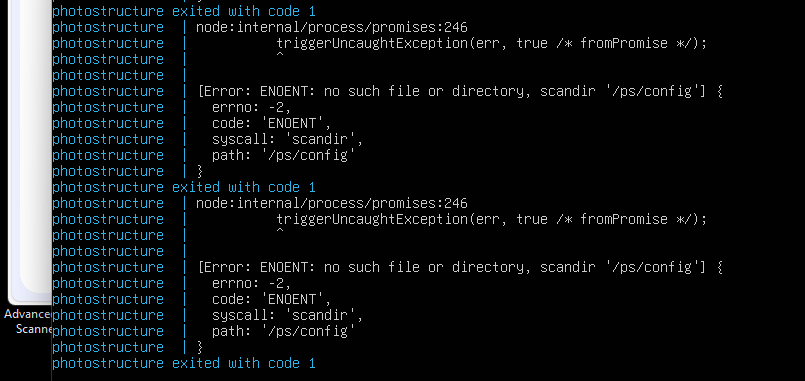
Done a new setup, and get an install error on the “sudo docker-compose up” command.
I then, on the working installation, tried to do a “docker-compose down” and afterwards a “docker-compose up”, and now I get the same error on this one. I did not do this before, as it was automatically starting as part of server start. Hence, no manual commands.
The error is during startup, I get this one again and again.
This results in a non-working setup. A general error in docker-compose setup or? Have looked in the documentation, however can not see I need to change anything due to the new version?
I suspect you’re not running the photostructure/server:beta image.
Be sure to also run docker-compose pull to get the latest version.
Also, because everyone likes to change everything all the time – know that docker-compose is now deprecated – if you follow the latest docker compose installation instructions and install the “docker-compose-plugin”, you need to change the docker-compose up -d command to docker compose up -d (you replace “docker-compose” with “docker compose”). (I need to update my documentation to accommodate this change made by the docker team!)
Also: please do send a zip of a problematic video! In case you didn’t know, video files are containers (and there are several handful of container types) that hold audio and video streams (of which there are several hundred different combinations of codecs)
Browsers are very persnickety with what containers, audio codec, and video codec combinations they will render – I have a bunch of example videos, and I tried to make sure the new transcode pipeline did the right thing, but your videos may be a container and codec combination that I didn’t consider yet.
If you can’t send the video file itself, if you could send me the output of:
First, sorry for the confusion yesterday, the error I reported was my bad, had a wrong access on the Lib library. I should have got the idea before reporting.
My new server and the old one are both working now. Both running the “beta” version. They behave the same, everything works besides the video streams.
On the new server I have done a test, and if “transcodeVideos = true” then it will transcode the videos and they show correctly. As I have 2000+ videos, I was using “transcodeVideos = false” with great success, as it imports videos super fast. Everything worked.
I have exposed my test server on the internet directly for you to see the problem directly. It is using the below docker-compose.yml file. I know that the videos was working with “transcodeVideos = false” on the 2024 alpha version. If there is a way to get the 2024 version installed, I can install it on a second test server and show the differences, might help in finding the problem
The link to the server I will send in a private message
  # Example additional directories to import into your library:
  - type: bind
    source: /home/home/A
    target: /a

  # Example additional directories to import into your library:
  - type: bind
    source: /home/home/B
    target: /b

  # Example additional directories to import into your library:
  - type: bind
    source: /home/home/V
    target: /v

ports:
  - 1787:1787/tcp

environment:
  - "TZ=Etc/GMT" # < CHANGE THIS LINE
  - "PUID=1000" # < CHANGE THIS LINE: replace 1000 with the result of `id -u`
  - "PGID=1000" # < CHANGE THIS LINE: replace 1000 with the result of `id -g`
labels:
  - "com.centurylinklabs.watchtower.enable=true"
 I will do some tests to see if I can give more input.